
 Kia Forte: AVN Head Unit Removal
Second generation YD (2014-2018) / Kia Forte TD 2014-2018 Service Manual / Body Electrical System / AVN System / AVN Head Unit Removal
AVN Head Unit
|

| 1. |
Disconnect the negative (-) battery terminal.
|
| 2. |
Remove the center fascia panel.
(Refer to Body - "Center Fascia Panel")
|
| 3. |
Remove the cluster fascia panel.
(Refer to Body - "Cluster Fascia Panel")
|
| 4. |
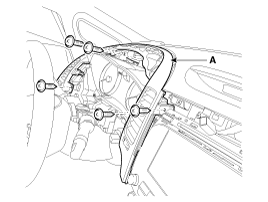
Remove the driver airvent duct assembly (A) after loosening the
mounting screws.
|
| 5. |
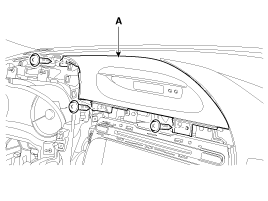
Remove the clock fascia panel (A) after loosening the mounting
screws.
|
| 6. |
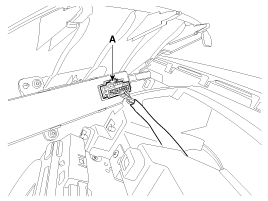
Disconnect the clock connector (A).
|
| 7. |
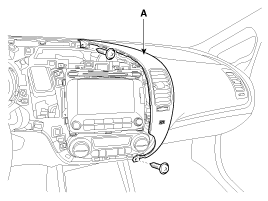
Remove the center airvent duct assembly [RH] (A) after loosening
the mounting screews.
|
| 8. |
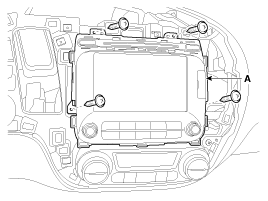
Remove the ANV head unit (A) after loosening the mounting.
|
| 9. |
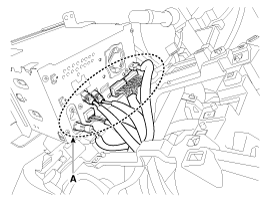
Remove the AVN head unit connectors and cables (A).
|
 AVN Head Unit Components
AVN Head Unit Connector (AVN)
Connector Pin Information
No.
Connector A
Connector B
1
Rear left speaker (+)
MM CAN high
2
...
 AVN Head Unit Installation
1.
Connect the AVN head unit connectors and cables.
2.
Install the AVN head unit.
3.
Install the airvent ducts ...
See also:
Interior light
Do not use the interior lights for extended periods when the engine is not running.
It may cause battery discharge.
WARNING - Interior light
Do not use the interior lights when driving in the dark ...
Front Strut Assembly Replacement
1.
Loosen the wheel nuts slightly.
Raise the vehicle, and make sure it is securely supported.
2.
Remove the front wheel and tire (A ...
Filler-Neck Assembly Installation
1.
Install in the reverse order of removal.
Filler-neck assembly bracket
installation bolt :
7.8 ~ 11.8 N.m (0.8 ~ 1.2 kgf.m, 5.8 ...
Categories
- Home
- Kia Forte BD 2019-2026 Owners Manual
- Kia Forte BD 2019-2026 Service Manual
- First Generation
- Second generation
- Kia Forte TD 2014-2018 Owners Manual
- Kia Forte TD 2014-2018 Service Manual

Copyright � www.kifomanual.com 2014-2026