
 Kia Forte: AGM Battery Cleaning
Second generation YD (2014-2018) / Kia Forte TD 2014-2018 Service Manual / Engine Control / Fuel System / ISG (Idle Stop & Go) System / AGM Battery Cleaning
| 1. |
Make sure the ignition switch and all accessories are in the OFF
position.
|
| 2. |
Disconnect the battery cables (negative first).
|
| 3. |
Remove the battery from the vehicle.
|

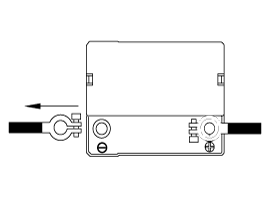
| 4. |
Inspect the battery tray for damage caused by the loss of electrolyte.
If acid damage is present, it will be necessary to clean the area with
a solution of clean warm water and baking soda. Scrub the area with
a stiff brush and wipe off with a cloth moistened with baking soda and
water.
|
| 5. |
Clean the top of the battery with the same solution as described
above.
|
| 6. |
Inspect the battery case and cover for cracks. If cracks are present,
the battery must be replaced.
|
| 7. |
Clean the battery posts with a suitable battery post tool.
|
| 8. |
Clean the inside surface of the terminal clamps with a suitable
battery cleaning tool. Replace damaged or frayed cables and broken terminal
clamps.
|
| 9. |
Install the battery in the vehicle.
|
| 10. |
Connect the cable terminals to the battery post, making sure tops
of the terminals are flush with the tops of the posts.
|
| 11. |
Tighten the terminal nuts securely.
|
| 12. |
Coat all connections with light mineral grease after tightening.
|
 AGM Battery Inspection
Battery Diagnostic Flow
Vehicle parasitic current inspection
1.
Turn all the electric devices OFF, and then turn the ignition
switch OFF.
...
 DC/DC Converter Description
Due to the considerably more frequent occurrence of starting operations,
the electrical load that occurs often leads to voltage dips in the vehicle network.
In order to stabilize the power s ...
See also:
PTC Heater Description
The PTC (Positive Temperature Coefficient) heater is installed at the
exit or the backside of the heater core.
The PTC heater is an electric heater using a PTC element as an auxiliary
hea ...
Control Shaft Complete Installation
1.
Install in the reverse order of removal.
•
...
Front Washer Motor Inspection
1.
With the washer motor connected to the reservoir tank, fill the
reservoir tank with water.
...
Categories
- Home
- Kia Forte BD 2019-2026 Owners Manual
- Kia Forte BD 2019-2026 Service Manual
- First Generation
- Second generation
- Kia Forte TD 2014-2018 Owners Manual
- Kia Forte TD 2014-2018 Service Manual

Copyright © www.kifomanual.com 2014-2026