
 Kia Forte: Audio Unit Components
Second generation YD (2014-2018) / Kia Forte TD 2014-2018 Service Manual / Body Electrical System / Audio / Audio Unit Components
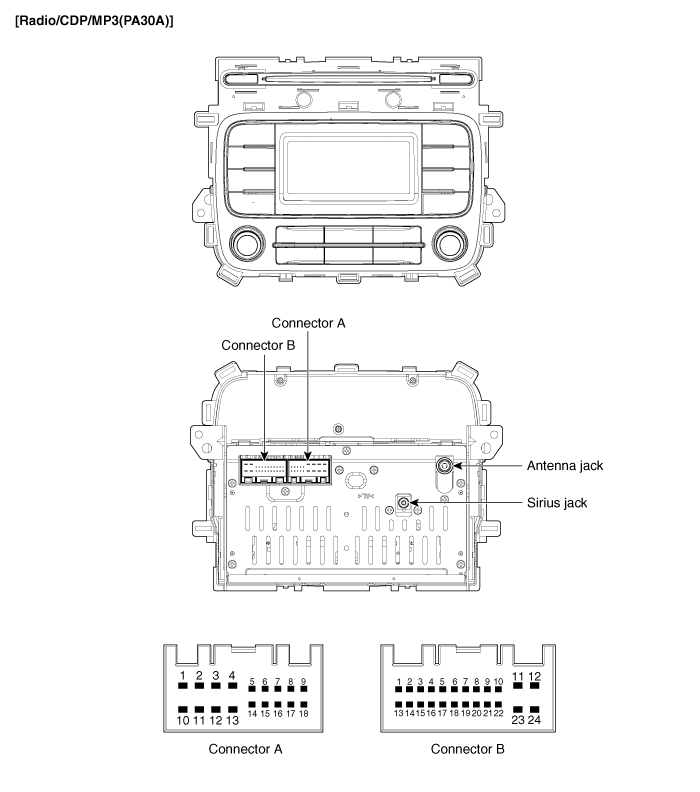
Connector Pin Information
| No. |
Connector A |
Connector B |
| 1 |
Rear left speaker (+) |
- |
| 2 |
Front left speaker (+) |
- |
| 3 |
Front right speaker (+) |
- |
| 4 |
Rear right speaker (+) |
Steering remocon |
| 5 |
- |
- |
| 6 |
- |
USB data line D (+) |
| 7 |
- |
USB/ iPod VDD |
| 8 |
Illumination (+) |
AUX R input |
| 9 |
Detent |
AUX ground |
| 10 |
Rear left speaker (-) |
Mic (+) (Bluetooth) |
| 11 |
Front left speaker (-) |
ACC |
| 12 |
Front right speaker (-) |
Battery (+) |
| 13 |
Rear right speaker (-) |
- |
| 14 |
- |
- |
| 15 |
- |
- |
| 16 |
- |
Vehicle speed |
| 17 |
Illumination (-) |
Remote control ground |
| 18 |
Remote antenna |
USB data line D (-) |
| 19 |
|
USB/ iPod ground |
| 20 |
AUX detect |
|
| 21 |
AUX L input |
|
| 22 |
Mic (-) (Bluetooth) |
|
| 23 |
- |
|
| 24 |
Power ground |
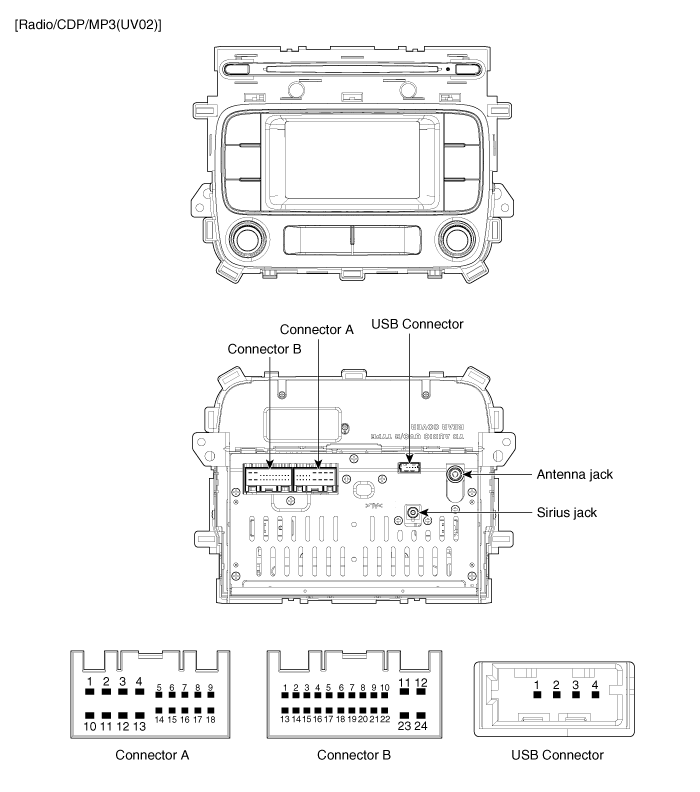
Connector Pin Information
| No. |
Connector A |
Connector B |
USB Connector |
| 1 |
Rear left speaker (+) |
CAN high |
USB/ iPod 5V |
| 2 |
Front left speaker (+) |
- |
USB data (-)/ iPod Tx |
| 3 |
Front right speaker (+) |
- |
USB data (+)/ iPod Rx |
| 4 |
Rear right speaker (+) |
Steering remote |
USB/ iPod ground |
| 5 |
- |
- |
|
| 6 |
- |
Camera video input |
|
| 7 |
- |
Camera battery (+) |
|
| 8 |
Illumination (+) |
AUX R Input |
|
| 9 |
- |
AUX ref. ground |
|
| 10 |
Rear left speaker (-) |
MIC(+) (Bluetooth) |
|
| 11 |
Front left speaker (-) |
ACC |
|
| 12 |
Front right speaker (-) |
B(+) |
|
| 13 |
Rear right speaker (-) |
CAN low |
|
| 14 |
- |
- |
|
| 15 |
- |
Auto light |
|
| 16 |
Door unlock |
Vehicle speed |
|
| 17 |
Illumination (-) |
Remote GND |
|
| 18 |
Remote antenna |
Camera video ground |
|
| 19 |
|
R position |
|
| 20 |
AUX detect |
||
| 21 |
AUX L Input |
||
| 22 |
MIC(-) (Bluetooth) |
||
| 23 |
Camera power ground |
||
| 24 |
Power GND |
 Component Location
1. Audio unit
2. Tweeter speaker
3. Antenna cable connector
4. Glass antenna amplifier (Radio)
5. Front door speaker
6. Rear door speaker
7. Antenna feeder cable
8. ...
 Audio Unit Removal
•
When prying with a flat-tip screwdriver, wrap it with
protective tape, and apply pro ...
See also:
Front Cross Member
* These dimensions indicated in this figure are
actual-measurement dimensions. [ Unit : mm (inch) ]
...
Transmitter Code Registration (Using GDS)
1.
Connect the DLC cable of GDS to the data link connector (16 pins)
in driver side crash pad lower panel, turn the power on GDS.
2.
...
Windshield Wiper-Washer Switch Removal
1.
Disconnect the negative (-) battery terminal.
2.
Remove the steering wheel.
(Refer to Steering System - "Steering Wheel")
...
Categories
- Home
- Kia Forte BD 2019-2026 Owners Manual
- Kia Forte BD 2019-2026 Service Manual
- First Generation
- Second generation
- Kia Forte TD 2014-2018 Owners Manual
- Kia Forte TD 2014-2018 Service Manual

Copyright © www.kifomanual.com 2014-2026