
 Kia Forte: Multimedia Jack Removal
Second generation YD (2014-2018) / Kia Forte TD 2014-2018 Service Manual / Body Electrical System / AVN System / Multimedia Jack Removal
| 1. |
Disconnect the negative (-) battery terminal.
|
| 2. |
Remove the floor console assembly.
(Refer to Body - "Floor Console Assembly")
|
| 3. |
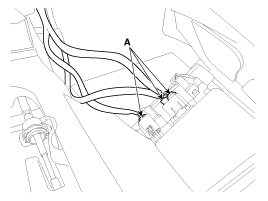
Disconnec the connectors (A) from the floor console assembly.
|
| 4. |
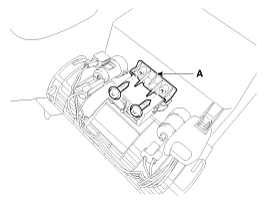
Remove the multimedia brackect (A) after loosening the mounting
screws (2EA).
|
| 5. |
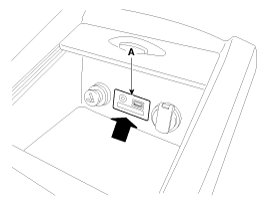
Remove the multimedia jack (A) after pushing the multimedia jack
in the direction of the arrow.
|
 Multimedia Jack Description
The multimedia jack on the console upper cover is for customers who like
to listen to external portable music players like the MP3, iPod and etc., through
the vehicle's sound system when ...
 Multimedia Jack Installation
1.
Install the multimedia jack.
2.
Connect the multimedia jack connector.
3.
Install the floor console assembly ...
See also:
Front Hub / Knuckle Reassembly
1.
Install the hub bearing to the knuckle assembly.
(1)
Lay the knuckle assembly (A) on press.
(2)
...
Auto Defogging Actuator Inspection
1.
Turn the ignition switch OFF.
2.
Disconnect the auto defogging connector.
3.
Verify that the auto defoggin ...
Mode Control Actuator Replacement
1.
Disconnect the negative (-) battery terminal.
2.
Remove the crash pad lower panel.
(Refer to Body -"Crash Pad Lower Panel") ...
Categories
- Home
- Kia Forte BD 2019-2026 Owners Manual
- Kia Forte BD 2019-2026 Service Manual
- First Generation
- Second generation
- Kia Forte TD 2014-2018 Owners Manual
- Kia Forte TD 2014-2018 Service Manual

Copyright © www.kifomanual.com 2014-2026