
 Kia Forte: Photo Sensor Replacement
Second generation YD (2014-2018) / Kia Forte TD 2014-2018 Service Manual / Heating,Ventilation, Air Conditioning / Air Conditioning System / Photo Sensor Replacement
| 1. |
Disconnect the negative (-) battery terminal.
|
| 2. |
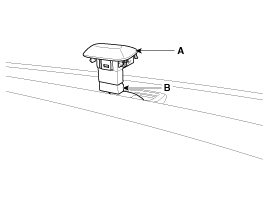
With a flat-head screwdriver, remove the photo sensor (A) from
the center of the defrost nozzle, and disconnect the connector (B).
|
| 3. |
Install in the reverse order of removal.
|
 Photo Sensor Inspection
1.
Turn the ignition switch ON.
2.
Connect the GDS.
3.
Emit intensive light toward the photo sensor using a lam ...
 Auto Defogging Sensor Description
The auto defogging sensor is installed on the front windshield glass.
The auto defogging sensorr senses moisture on the windshild. The air conditioner
control module receives the signal from ...
See also:
Oil Pan Installation
1.
Install the oil screen (A) with a new gasket (B).
Tightening torque
Bolt :
19.6 ~ 26.5 N.m (2.0 ~ 2.7 kgf.m, 14.5 ~ 19.5 lb ...
Crash Pad Upper Panel Component Location
1. Crash pad upper panel
...
Inspection
Rear Brake Disc Thickness Check
1.
Check the brake pads for wear and fade.
2.
Check the brake disc for damage and cracks.
...
Categories
- Home
- Kia Forte BD 2019-2026 Owners Manual
- Kia Forte BD 2019-2026 Service Manual
- First Generation
- Second generation
- Kia Forte TD 2014-2018 Owners Manual
- Kia Forte TD 2014-2018 Service Manual

Copyright © www.kifomanual.com 2014-2026