 Kia Forte: Steering Column Shroud Panel Replacement
[Steering column shroud lower panel]
| •
|
Put on gloves to protect your hands.
|
|
| •
|
When prying with a flat-tip screwdriver, wrap it with
protective tape, and apply protective tape around the related
parts, to prevent damage.
|
| •
|
Use a plastic panel removal tool to remove interior trim
pieces to protect from marring the surface.
|
| •
|
Take care not to bend or scratch the trim and panels.
|
|
|
1. |
Remove the crash pad lower panel.
(Refer to Crash Pad - "Crash Pad Lower Panel")
|
|
2. |
After loosening the mounting screws, then remove the steering
column shroud lower panel (A).
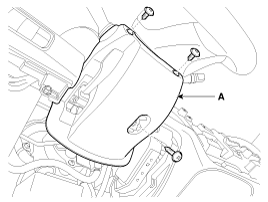
|
|
3. |
Install in the reverse order of removal.
|
• |
Replace any damaged clips.
|
|
|
[Steering column shroud upper panel]
| •
|
Put on gloves to protect your hands.
|
|
| •
|
When prying with a flat-tip screwdriver, wrap it with
protective tape, and apply protective tape around the related
parts, to prevent damage.
|
| •
|
Use a plastic panel removal tool to remove interior trim
pieces to protect from marring the surface.
|
| •
|
Take care not to bend or scratch the trim and panels.
|
|
|
1. |
Remove the cluster fascia panel.
(Refer to Crash Pad - "Cluster Fascia Panel")
|
|
2. |
Install in the reverse order of removal.
|
• |
Replace any damaged clips.
|
|
|
1. Steering column shroud lower panel
2. Steering column shroud upper panel
...
[LH]
1. Crash pad side cover [LH]
[RH]
1. Crash pad side cover [RH]
...
See also:
Audio Remote Control Removal
1.
Disconnect the negative (-) battery terminal.
2.
Remove the driver airbag module.
(Refer to Restraint - "Driver Airbag (DAB) Mod ...
Blower Motor Replacement
1.
Disconnect the negative (-) battery terminal.
2.
Disconnect the connector (A) of the blower motor.
3.
Remove ...
Auto Defogging Sensor Description
The auto defogging sensor is installed on the front windshield glass.
The auto defogging sensorr senses moisture on the windshild. The air conditioner
control module receives the signal from ...



 Steering Column Shroud Panel Component Location
 Crash Pad Side Cover Component Location