
 Kia Forte: Cluster Fascia Panel Replacement
Second generation YD (2014-2018) / Kia Forte TD 2014-2018 Service Manual / Body (Interior and Exterior) / Crash Pad / Cluster Fascia Panel Replacement
|

|

| 1. |
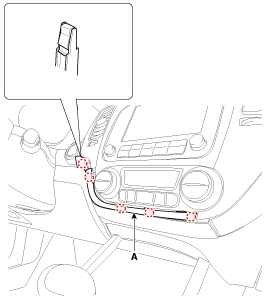
Using a screwdriver or remover, remove the center garnish [LH]
(A).
|
| 2. |
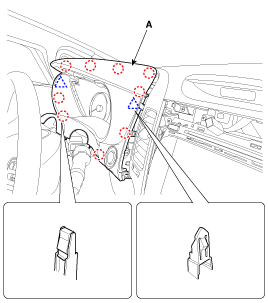
Using a screwdriver or remover, remove the cluster fascia panel
(A).
|
| 3. |
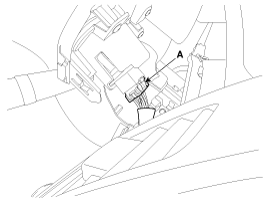
Disconnect the start/stop button connector (A).
|
| 4. |
Install in the reverse order of removal.
|

 Cluster Fascia Panel Component Location
1. Cluster fascia panel
...
 Center Fascia Panel Component Location
1. Center fascia panel
...
See also:
Fuel Pump Inspection
[Fuel pump]
1.
Turn ignition switch OFF and disconnect the negative (-)battery
cable.
2.
Remove the fuel pump assembly.
...
Hood switch Description
The hood switch is included as the influencing factors in the calculation
of the ISG function. If the hood is open, the engine must not be started or
stopped by the ISG function for safety re ...
Tilt and telescoping steering
Tilt steering allows you to adjust the steering wheel before you drive. You can
also raise it to give your legs more room when you exit and enter the vehicle.
The steering wheel should be positioned ...
Categories
- Home
- Kia Forte BD 2019-2026 Owners Manual
- Kia Forte BD 2019-2026 Service Manual
- First Generation
- Second generation
- Kia Forte TD 2014-2018 Owners Manual
- Kia Forte TD 2014-2018 Service Manual

Copyright � www.kifomanual.com 2014-2026