
 Kia Forte: Changing Priority
What is Priority?
It is possible to pair up to five Bluetooth® Wireless Technology devices with the car audio system.
The "Change Priority" feature is used to set the connection priority of paired phones.
Press the

key
![Select [Phone]](images/books/3/1/page.h423.gif)
Select [Phone]
![Select [Phone List]](images/books/3/1/page.h424.gif)
Select [Phone List]
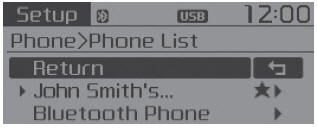
From the paired phone list, select the phone you want to switch to the highest priority, then select [Change Priority] button from the Menu. The selected device will be changed to the highest priority.
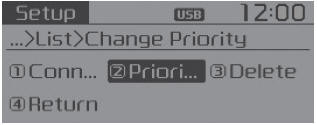
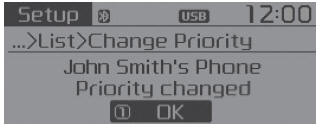
Priority icon will be displayed when the selected phone is set as a priority phone.
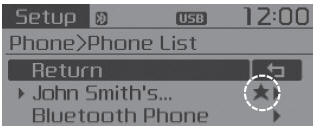
Disconnecting a Device
Press the

key
![Select [Phone]](images/books/3/1/page.h426.gif)
Select [Phone]
![Select [Phone List]](images/books/3/1/page.h427.gif)
Select [Phone List]
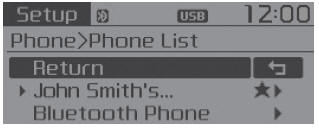
From the paired phone list, select the currently connected device and select [Disconnect] button.
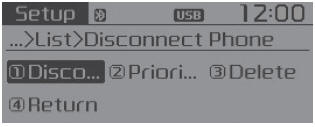
Deleting a Device
Press the

key
![Select [Phone]](images/books/3/1/page.h429.gif)
Select [Phone]
![Select [Phone List]](images/books/3/1/page.h430.gif)
Select [Phone List]
![From the paired phone list, select the device you want to delete and select [Delete]](images/books/3/1/page.h259.jpg)
From the paired phone list, select the device you want to delete and select [Delete] button.
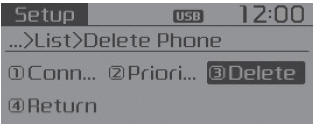
- When deleting the currently connected device, the device will automatically be disconnected to proceed with the deleting process.
- If a paired Bluetooth® Wireless Technology device is deleted, the device’s call history and contacts data will also be deleted.
- To re-use a deleted device, you must pair the device again.
 Phone
Phone
Before using the Bluetooth® Wireless Technology phone features
In order to use Bluetooth® Wireless Technology phone, you must first pair
and connect the Bluetooth® Wireless Technology mobile ...
 Using Bluetooth® Wireless Technology
Phone Menu Screen
Phone Menus
With a Bluetooth® Wireless Technology device connected, press the
key to display the Phone menu screen.
1) Favorite : Up to 20 frequently used contacts saved f ...
See also:
Variable Charge Motion Actuator (VCMA) Circuit diagram
(M/T)
(A/T)
...
Transaxle Control Module (TCM) Circuit Diagram
...
Air bag - advanced supplemental restraint system
(1) Driver’s front air bag
(2) Passenger’s front air bag
(3) Side air bag
(4) Curtain air bag
Even in vehicles with air bags, you and your passengers must always wear the
safety belts pro ...
Categories
- Home
- Kia Forte BD 2019-2026 Owners Manual
- Kia Forte BD 2019-2026 Service Manual
- First Generation
- Second generation
- Kia Forte TD 2014-2018 Owners Manual
- Kia Forte TD 2014-2018 Service Manual
