 Kia Forte: Outside Rear View Mirror Replacement
| •
|
Put on gloves to protect your hands.
|
|
| •
|
When prying with a flat-tip screwdriver, wrap it with
protective tape, and apply protective tape around the related
parts, to prevent damage.
|
| •
|
Take care not to scratch the body surface.
|
|
|
1. |
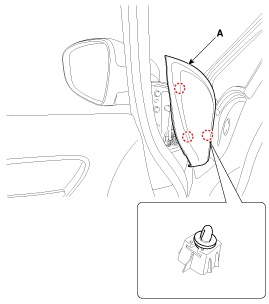
Using a screwdriver or remover, remove the front door quadrant
inner cover (A).
|
|
2. |
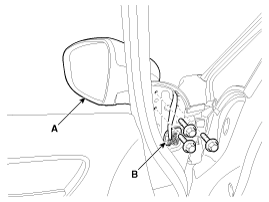
Disconnect the outside rear view mirror connector (B).
|
|
3. |
After loosening the mounting bolts, then remove the outside rear
view mirror (A).
Tightening torque :
6.9~10.8 N.m(0.7~1.1 kgf.m, 5.1~8.0 lb-ft)
|
|
|
4. |
Install in the reverse order of removal.
|
• |
Make sure the connector is connected properly.
|
|
• |
Replace any damaged clips.
|
|
|
(2Door)
| •
|
Put on gloves to protect your hands.
|
|
| •
|
When prying with a flat-tip screwdriver, wrap it with
protective tape, and apply protective tape around the related
parts, to prevent damage.
|
| •
|
Take care not to scratch the body surface.
|
|
|
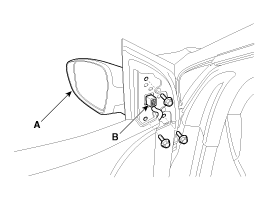
1. |
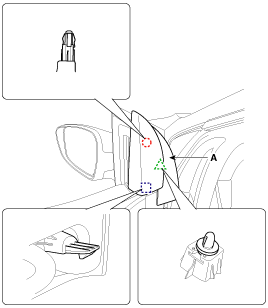
Using a screwdriver or remover, remove the front door quadrant
inner cover (A).
|
|
2. |
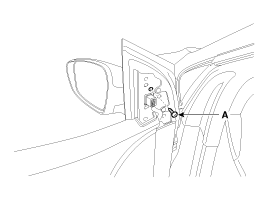
Loosen the outside rear view mirror mounting screw (A).
|
|
3. |
After loosening the mounting bolts, then remove the outside rear
view mirror (A).
|
|
4. |
Disconnect the outside rear view mirror connector (B).
Tightening torque :
6.9~10.8 N.m(0.7~1.1 kgf.m, 5.1~8.0 lb-ft)
|
|
|
5. |
Install in the reverse order of removal.
|
• |
Make sure the connector is connected properly.
|
|
• |
Replace any damaged clips.
|
|
|
(4Door, 5Door)
1. Outside rear view mirror
(2Door)
1. Outside rear view mirror
...
1. Inside rear view mirror
...
See also:
Failure Diagnosis
1.
In principle, ESC and TCS controls are prohibited in case of ABS
failure.
2.
When ESC or TCS fails, only the failed system control is pr ...
Rear Seat Cushion Cover Replacement
•
Put on gloves to protect your hands.
...
Tightening Torque
Part tightened
N.m
Kgf.m
lbf.ft
Condenser - Discharge hose
7.8~11.7
0.8~1.2
5.7~8.6
Condenser - Liquid tube
Comp ...



 Outside Rear View Mirror Component Location
 Inside Rear View Mirror Component Location