
 Kia Forte: Multimedia Jack Removal
Second generation YD (2014-2018) / Kia Forte TD 2014-2018 Service Manual / Body Electrical System / Audio / Multimedia Jack Removal
| 1. |
Disconnect the negative (-) battery terminal.
|
| 2. |
Remove the floor console assembly.
(Refer to Body - "Floor Console Assembly")
|
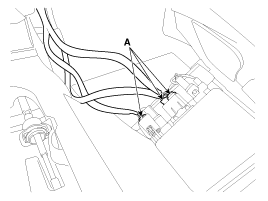
| 3. |
Disconnec the connectors (A) from the floor console assembly.
|
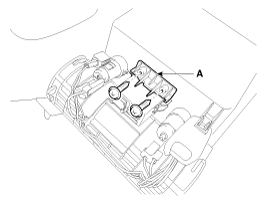
| 4. |
Remove the multimedia brackect (A) after loosening the mounting
screws (2EA).
|
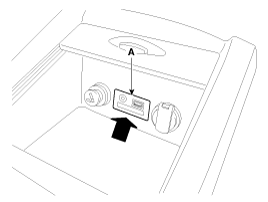
| 5. |
Remove the multimedia jack (A) after pushing the multimedia jack
in the direction of the arrow.
|
 Multimedia Jack Description
The multimedia jack on the console upper cover is for customers who like
to listen to external portable music players like the MP3, iPod and etc., through
the vehicle's sound system when ...
 Multimedia Jack Installation
1.
Install the multimedia jack.
2.
Connect the multimedia jack connector.
3.
Install the floor console assembly ...
See also:
ETC (Electronic Throttle Control) System Inspection
Throttle Position Sensor (TPS)
1.
Connect the GDS on the Data Link Connector (DLC).
2.
Start the engine and measure the output voltage of TP ...
TPMS Receiver
1.
Mode
(1)
Virgin State
A.
The receiver as a sole part is shipped in this
state. ...
Rear Console Cover Component Location
1. Rear console cover
...
Categories
- Home
- Kia Forte BD 2019-2026 Owners Manual
- Kia Forte BD 2019-2026 Service Manual
- First Generation
- Second generation
- Kia Forte TD 2014-2018 Owners Manual
- Kia Forte TD 2014-2018 Service Manual

Copyright © www.kifomanual.com 2014-2026