
 Kia Forte: Sound settings
Press the

key
![[Sound] through](images/books/3/1/page.h177.gif) Select
Select
[Sound] through

TUNE knob or key

Select menu through

TUNE knob
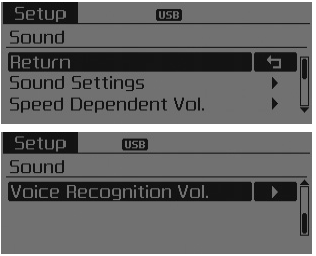
Sound Settings
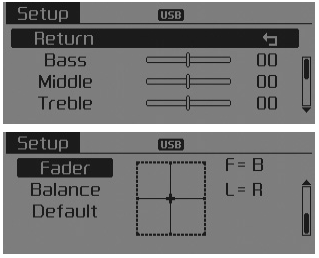
This menu allows you to set the ‘Bass, Middle, Treble’ and the Sound Fader and Balance.
Select [Sound Settings]

Select menu through

TUNE knob
 Turn
Turn

TUNE knob left/right to set
- Bass, Middle, Treble : Selects the sound tone.
- Fader, Balance : Moves the sound fader and balance.
- Default : Restores default settings.
❈ Back : While adjusting values, pressing the

TUNE knob will restore the parent menu.
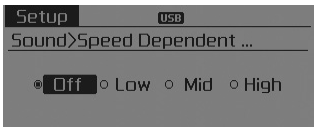
Speed Dependent Volume Control
This feature is used to automatically control the volume level according to the speed of the vehicle.
Select [Speed Dependent Vol.]
![Set in 4 levels [Off/Low/Mid/High] of](images/books/3/1/page.h188.gif)
Set in 4 levels [Off/Low/Mid/High] of

TUNE knob
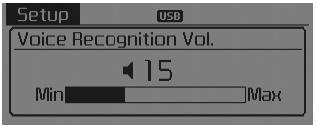
Voice Recognition Volume
Adjusts voice recognition volume. Select [Voice Recognition Vol.]

Set volume of

TUNE knob
 Setup
Setup
Display Settings
Press the
key
Select [Display] through
TUNE knob or key
Select menu through
TUNE knob
Mode Pop up
[Mode Pop up]
Changes
/
selection mode
During On stat ...
 System settings
Press the
key
Select [System]
Select menu through
TUNE knob
Memory Information
Displays currently used memory and total system memory.
Select [Memory Information]
OK ...
See also:
Muffler Components
1. Front muffler
2. Catalytic converter & center muffler assembly
3. Main muffler
4. Gasket
5. Hanger
...
Auto Head Lamp Leveling Unit Description
According to driving environment and loading state of vehicle, head lamp
lighting direction is changed to keep the driver's visibility range and to protect
the driver's vision from gl ...
Side air bag
Your vehicle is equipped with a side air bag in each front seat.
The purpose of the air bag is to provide the vehicle's driver and/or the front
passenger with additional protection than that ...
Categories
- Home
- Kia Forte BD 2019-2026 Owners Manual
- Kia Forte BD 2019-2026 Service Manual
- First Generation
- Second generation
- Kia Forte TD 2014-2018 Owners Manual
- Kia Forte TD 2014-2018 Service Manual
